
If your business offers audio or video content that might be viewed or listened to by people in the European Union, you will need to ensure that it is compliant with the European Accessibility Act (EAA). As of this writing, the EAA enforces WCAG standards to WCAG 2.2. Read on to understand what you need to do to ensure you are meeting this standard.

What are captions and subtitles?
Although the two terms are used interchangeably, they are not the same thing. Understanding the distinction between "captioning" and "subtitling" is crucial for ensuring compliance with local and international accessibility laws, including the EAA (European Accessibility Act).

Subtitles
Subtitling was invented in the 1930s when silent movies transitioned to “talkies.” Since not a lot of movies were produced each year, audiences would want to see movies made in other languages. Subtitling was a way for audiences to watch these foreign movies and still have dialogue. Subtitling was never designed for people who are Deaf or hard of hearing: it assumes the customer can hear all the music, sound effects, off-screen dialogue, and can tell who is speaking. Subtitles can be open or closed: meaning the customer can control whether they are on or off (closed) or they are “burned in” to the film and cannot be turned off (open).

Captioning
Captioning, on the other hand, refers to the textual representation of spoken dialogue, including non-speech elements such as sound effects and speaker identification. It was invented in the 1970s and is primarily designed for individuals who are D/deaf or hard of hearing, in order to help them access all the auditory information in videos. They became a mandated broadcast requirement in the United States. Captions can also be open or closed, though the most common now is Closed Captions (which is also a proper noun). In countries outside of the United States and Canada, this service is called subtitling for the deaf and hard of hearing (SDH), and this is probably why the confusion continues. From this point forward, I will use the word captioning to refer to both captioning and SDH.
When it comes to multi-media content like videos, you must provide an equivalent visual experience for all auditory content. Standard subtitles will not be sufficient; you will need to provide captions in the languages of the video’s dialogue and/or audio track.
Transcripts
When it comes to audio content, you must also provide a transcript of that content. Transcripts are a written version of the script of the video or audio content. Most content authors offer it as a link or a section on the page after the video or audio file. In some instances, it "follows along" with the video or audio content by highlighting the current sentence or word, or by scrolling on the screen. It can easily be obtained from the captioning file once that is completed. I will cover transcripts more fully in another article.

Pre-recorded vs live content
There are specific requirement differences for pre-recorded content vs. live content.
Pre-recorded content refers to movies, instructional videos, training content and other videos that were recorded and uploaded to your site. Creating captions for this type of content involves transcribing audio by hand and formatting it into a file with timestamps. While transcribing can be time-consuming and challenging without the right tools or skills, experienced professionals with the necessary software can develop captions efficiently. Captions are required to be compliant with WCAG, level A.
Live content refers to content that is streaming or otherwise happening as people are watching it. Live content can also be transcribed by hand or is automatic. It does not need timestamps, though if it is recorded with the content it will require tweaks and timestamping. Captions are required to be compliant with WCAG, level AA.
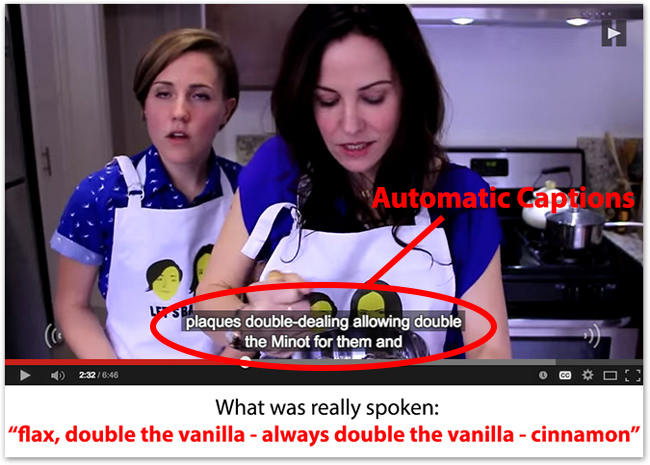
Automatic captions
High-quality captions require an understanding of what non-speech audio elements to include, making it more of an art than a science. It can be time-consuming, especially for people who do not do it frequently. Many organizations will opt to use automatic captioning instead of paying for a manual captioner, but automatic captioning is not sufficient. It almost always requires manual refinement. They are trained on “standard dialects,” meaning they struggle with accents, dialects, and less-used languages. They are terrible at identifying speakers and off-screen noises, and are often incapable of separating sound effects from dialogue. If you opt to use automatic captioning, realize that it is essential that you review the output before publishing.
Conclusion
Not only is building for accessibility good business sense, it is also a legal requirement in most countries. In 2025, the EU passed the EAA (European Accessibility Act), which strengthened the commitment to accessibility by requiring websites for adhere to WCAG standards or face fines (up to €900,000 in the Netherlands), and other legal action. Many other countries are following suit, with planned updates to accessibility in 2026 in Canada, the UK, the US, and Australia.
To comply with accessibility standards and provide a more inclusive experience for all, you must implement accurate, synced captioning and transcripts for all audio and video content for those who rely on it.
Worried your site may not be WCAG-compliant?
Don't be. I can help you decide what needs to be done (if anything).
* For instance, accessibility is proactive not reactive, championed at all levels, and included in the definition of done for product development.
** For a breakdown on the cost of remediation, see Karl Groves' excellent article on Understanding the Cost of Not Being Accessible
