
Artificial intelligence is expected to fundamentally transform the global workforce by 2050, according to reports from PwC, McKinsey, and the World Economic Forum. Estimates suggest that up to 60% of current jobs will require significant adaptation due to AI. Automation and intelligent systems will become an integral part of the workplace. This doesn't necessarily mean a loss in jobs. In fact, the World Economic Forum estimates that 19 million jobs will be created globally while only 9 million will be lost. However, rapid AI adoption isn't inherently inclusive. When these systems are deployed without accessibility in mind, they can actively lock people with disabilities out of communities, including the workplace. I set out to review the top AI assistants for their accessibility.

Testing methodology
I settled on the following three AI assistants to conduct my assessment of. This list was generated after some initial research of YouTube reviews, Reddit threads, and searches (I did not use Google as my search engine) into which seemed to be the most popular. The three AI assistants are:
I decided to do quick assessments of each of these sites for keyboard navigation, color contrast, automated testing with Axe DevTools and IBM's Accessibility Assessment tool, and screenreader testing with Voiceover. While I know that Voiceover is not the most common screenreader, it is the one of choice for all Mac users, and I am a Mac user. I also only conducted these tests on a desktop, since that is the tool most employees are given by their employer.
In part 1 of this series, I will review Claude, by Anthropic.
Claude
Claude is a next-gen, conversational AI assistant developed by Anthropic. It is designed for "safe, accurate, and high-performance, human-like interaction." It acts as a versatile, multimodal tool capable of analyzing documents, writing code, brainstorming, and summarizing large, complex text inputs. Claude is noted for its "Constitutional AI" approach, focusing on ethics and reliability.
Automated testing
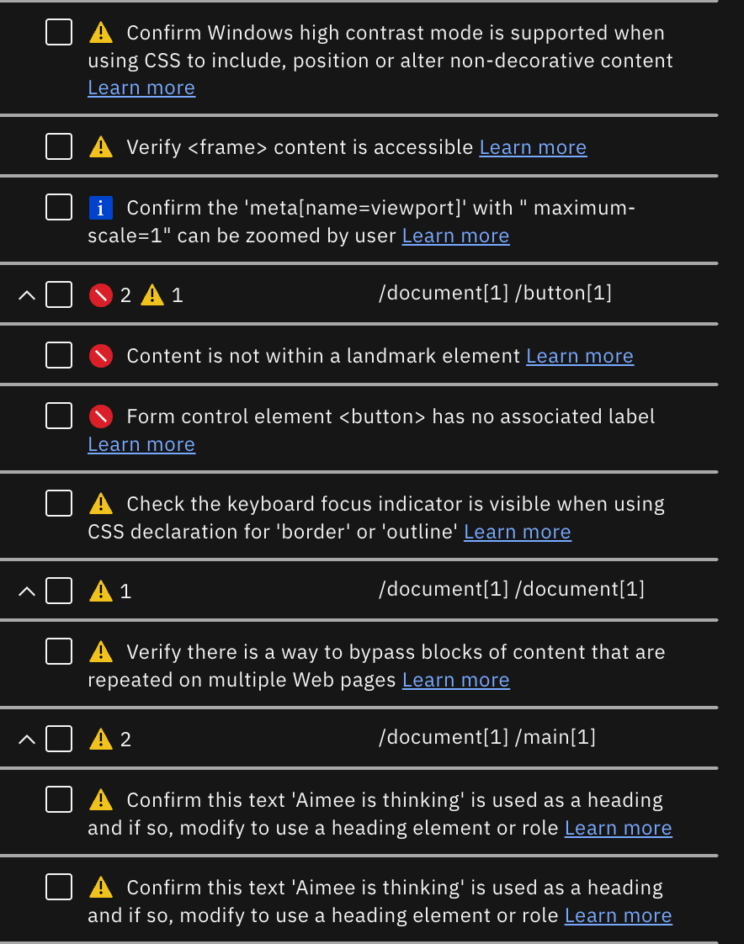
I typically run automated tests first, so that I have an idea of what errors I will encounter later in manual testing. The automated tests returned a lot of errors for what seems visually like a simple interface to code. Just a few of the errors I found:
- Headers do not have labels. This is a violation of WCAG 2.4.6 - Headings and Labels, and WCAG 1.3.1 - Info and Relationships.
- There are no landmarks on the page.This is also a violation of WCAG 1.3.1 - Info and Relationships.
- Buttons and other form field elements do not have visible or even defined labels or names. This is a violation of WCAG 1.3.5 - Identify Input Purpose, WCAG 3.3.2 - Labels or Instructions, WCAG 2.5.3 - Label in Name, and WCAG 4.1.2 - Name, Role, Value.
All of these types of WCAG violations that I found are programmatic errors and can be easily fixed by a software engineer who understands accessible code.
Keyboard navigation
Claude works very well for keyboard-only navigation. I encountered no focus traps with a quick manual test. There were only a few instances where the focus indicator was non-existent and I got "lost" on the page. The focus indicator is also very subtle in general. Contrast should be boosted for this element since it is how keyboard and other assistive tech users will know where they are on a page. The focus indicator needs to be visible and prominent at all times or it is a violation of WCAG 2.4.7 - Focus Visible and WCAG 2.4.13 - Focus Appearance. I recommend designing an intentional, high-contrast focus state for all interactive components and using it consistently across the site.
Designers should also map out the keyboard navigation so that the flow from element to element is logical and intuitive for all users. There were a few instances where the focus jumped to an unexpected place that didn't follow either the visual flow or the information hierarchy of the site.
Color contrast
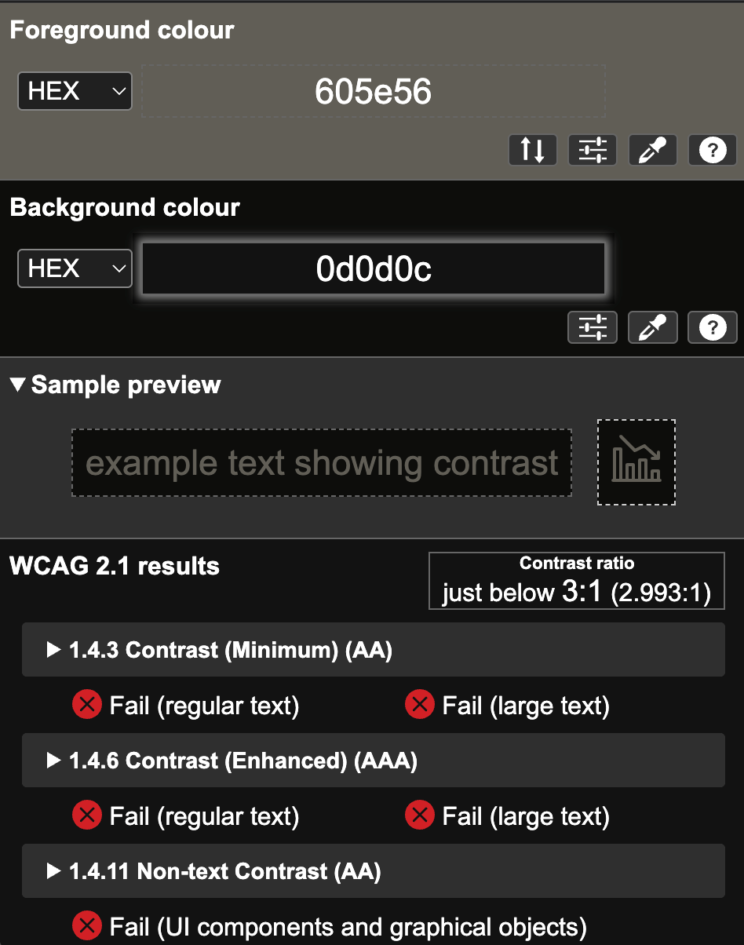
The Claude interface is designed to be very easy on the eyes and I would say it is one of the more elegant AI interfaces I've tested. However, in the effort to be elegant and professional, the usability was sacrificed. Color contrast is too low on the main UI elements on the landing page (the text box) and failed. The color palette across the site needs greater contrast and the designers should also test for color combinations that might fail for color blindness. Currently, the site fails WCAG 2.4.13 - Focus Appearance, WCAG 1.4.11 - Non-text Contrast, and WCAG 1.4.3 - Contrast.
Screenreader testing
Unfortunately, the Claude interface does not seem to be have been adequately tested for screenreader users. While the initial page load brings the user to the main content area (text prompt for a new chat), once a user has entered a prompt and Claude has provided an answer, the answer is not read out! In addition, navigation is difficult, with multiple focus traps. It was very difficult to use a screenreader to get to the navigation for moving from page to page. On pages other than the landing page, visible elements were not navigable by screenreader.
Not having your site accessible to screenreaders is a major accessibility violation. In addition to the violations called out previously, this site is also in violation of WCAG 2.1.2 - No Keyboard Trap, WCAG 2.1.1 - Keyboard, WCAG 2.4.1 - Bypass Blocks, WCAG 2.4.4 - Link Purpose, and WCAG 1.3.2 - Meaningful Sequence.
In Summary
Accessibility isn't just about compliance; it's about creating products that work for all users, whether they're using assistive technologies, choose to navigate with a keyboard for the day, or not. Although this recent audit uncovered quite a few issues, the good news is that each issue identified has an actionable solution. Prioritizing these fixes will also be good business sense, since as the W3C points out, there are multiple benefits from having an accessible site. If AI is the future, we owe it to people who rely on accessible interfaces to ensure that they can join that future.
Worried your site may not be WCAG-compliant?
Don't be. I can help you decide what needs to be done (if anything).
