
Many organizations find it difficult to justify focusing resources on accessibility without a good understanding of the benefit to their bottom line. It can seem like a waste of time to implement processes that grow your accessibility maturity* and ensure your organization is meeting accessibility compliance, especially if you don't believe you have any users who require accessibility.

However, it is estimated that roughly 20% of the world's population has one or more disability, and the European Commission has found that the vast majority of them are online (82% of people with a severe disability and 89% of people with a moderate disability, compared to 95.2% with no disability). If your analytics don't reflect that market, you are turning away potential users by not ensuring that your content is accessible. You are also leaving yourself open to lawsuits in the US or fines in the EU and other countries.
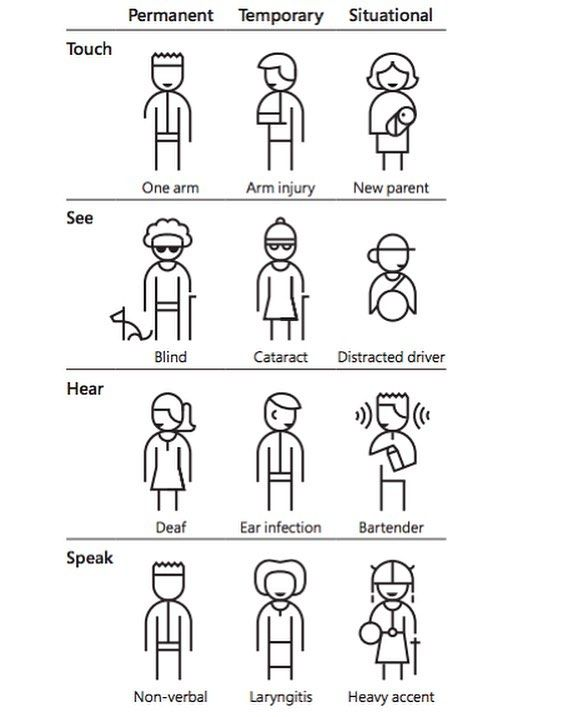
What is Digital Accessibility?
Digital accessibility means designing and building websites, apps, documents, and other digital tools so everyone, including people with disabilities (visual, auditory, motor, cognitive), can perceive, understand, navigate, and interact with them, ensuring equal access to information. It removes barriers so users can access the digital world using the tech they choose, including assistive tech such as screenreaders, keyboards, and switches.
What is Inclusive Design?
Inclusive design is a user-centered design methodology that works to understand the needs, wants, and limitations of end users. This design process encourages organizations to solicit input from edge users such as those using accessible tech, to help uncover additional features and refine existing interfaces. Designs that come out of this feedback consistently has been shown to benefit all users by reducing cognitive load, increasing visibility, providing alternate ways of accessing content, and providing a code framework that works with translation, ROI, and search services.


Inclusive Design Increases Audience Share
The fact is, more people are able to easily access content when you make it accessible. Even people who don't consider themselves disabled find content easier to access when it is multi-modal, high contrast and well-organized. This American Life is a broadcast and podcast heard on more than 500 National Public Radio (NPR) stations by millions of listeners. In 2011, NPR committed to creating written transcripts for their entire archive of recorded programs, thus providing their audio content in a visual format. Providing transcripts met the legal obligations laid down by the Federal Communications Commission (FCC) and showed several financial benefits including:
- an increase in search traffic by 6.86%
- the growth in new, unique visitors increased 4.18%
- new inbound links to transcripts accounted for an increase in 3.89% of users
This was likely due to the increased usability, such as:
- users were able to access transcripts in noisy environments or when headphones weren't available
- users who spoke English as a second language or who struggled with accents reported a better understanding of the text
- text was more easily translated to foreign languages
- text was accessible to screenreaders and other accessible tech
- users could search and quote text, leading to more linking to recordings

Audits and Remediation are Expensive
While conducting an accessibility audit is a great way to understand what you need to do to make your website or app accessible, fixing the issues can be incredibly expensive. I have seen this in my own work. On a recent project to get a major streaming service's website and apps compliant with the EAA (European Accessibility Act), one accessibility audit we conducted took teams over a year to finish remediation. By the time we had finished remediation, it was time to conduct another audit cycle as tons of new features had been implemented without accessibility testing before launch. I knew we needed to build accessibility testing into our regular automated and manual testing suite, so I set out to calculate how much time each cycle was costing us.
Tenon, an organization acquired by LevelAccess, estimates it takes seven hours to fix your average bug. There is no "typical" number of accessibility bugs, but with this particular project our total was around 1200 across the website and apps. Using that estimate, our audit cost the company 8400 hours (and somewhere around $3m). Now consider that if you are trapped in the audit-fix-audit-fix cycle, you could be conducting these as frequently as every 6 months. That is millions that could be spent on feature development.**
It's better to not create the problems in the first place. You will avoid these problems when your design team is trained on how to create inclusive designs from the get-go, and they communicate the accessibility requirements to developers who know how to code for accessibility (hint: it's not by adding ARIA tags everywhere).
Accessibility is a Legal Requirement
Not only is building for accessibility good business sense, it is also a legal requirement in most countries. In 2025, the EU passed the EAA (European Accessibility Act), which strengthened the commitment to accessibility by requiring websites for adhere to WCAG standards or face fines (up to €900,000 in the Netherlands), and other legal action. Many other countries are following suit, with planned updates to accessibility in 2026 in Canada, the UK, the US, and Australia.
Lawsuits Are Expensive, Too
Even if your products and services are not available to citizens in the EU, if your site is inaccessible you still have the potential to face civil lawsuits for non-compliance in the US and other countries. There has been a surge in litigation over digital accessibility in the US in recent years as more services move online. While the number of lawsuits has grown year-over-year, there was a 37% surge between 2024 and 2025, with e-commerce and restaurant websites topping the list. Visit Darrow-Everett's insights for more statistics on this growing trend.
The trend is clear: there will be stronger pushes to make digital spaces across the world accessible. By having inaccessible websites or apps, your business is losing money by accidentally shutting out millions of potential customers and is leaving itself open to lawsuits and fines.
* For instance, accessibility is proactive not reactive, championed at all levels, and included in the definition of done for product development.
** For a breakdown on the cost of remediation, see Karl Groves' excellent article on Understanding the Cost of Not Being Accessible
Worried your site may not be WCAG-compliant?
Don't be. I can help you decide what needs to be done (if anything).
